Where can I host a Telegram bot for free?
On FadeHost. One bot free, 256 MB of RAM, 3 GB of disk, online 24/7. No credit card and nothing to renew.
Does a free Telegram bot really stay online 24/7?
Yes. A polling bot asks Telegram for updates over an outgoing connection, so it needs no web address and nothing puts it to sleep. If it crashes, it starts again on its own.
Do I need a credit card or to renew anything?
No to both. A verified email is all it takes. There is no button to press every few days, no ads to watch and no expiry date. Only a bot with no network traffic for 7 days is stopped, and you can start it again any time.
- No credit card
- No renewals
- No ads
- No sleep timer
How do I deploy my bot?
Get a token from BotFather, pick the starter template, your own GitHub repository or code you upload in the panel, and send /start. Every push to the branch redeploys the bot.
- 1
Get a token from BotFather
Message @BotFather in Telegram, send /newbot and copy the token it gives you.
- 2
Pick the template or your code
In the panel, open Apps, choose Host something and pick the Telegram bot. Use the template, a public or private GitHub repository, or upload your code.
- 3
Send /start
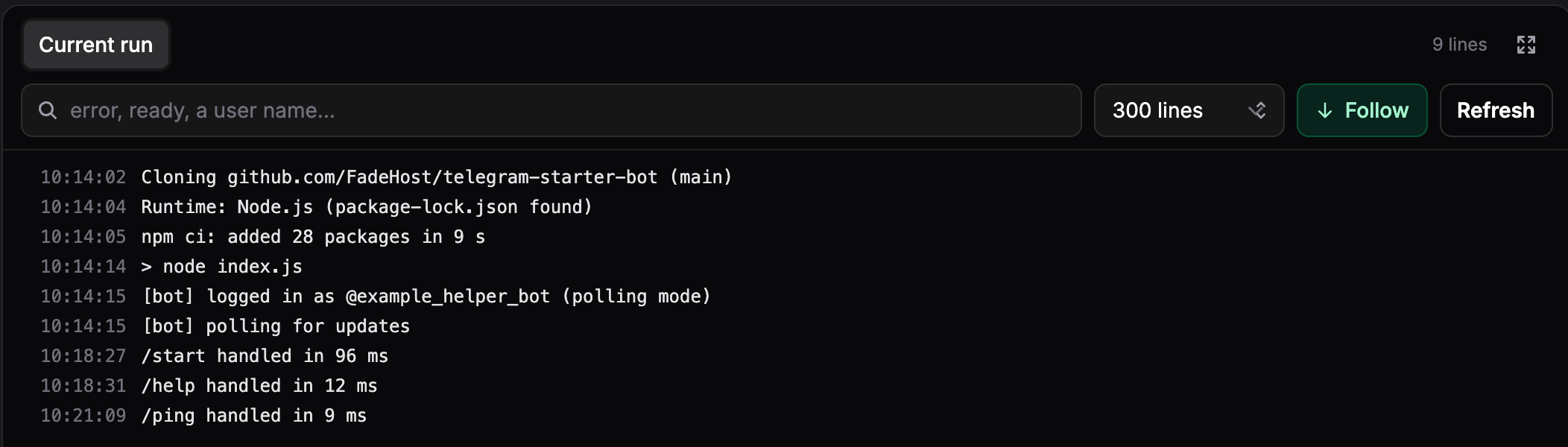
We install and start the bot. The live console shows it log in, and every push redeploys it.
TELEGRAM_BOT_TOKEN=123456789:AAF-token-from-botfatherThat is the only variable a polling bot needs. The starter bot on GitHub deploys as it is.
Can it use webhooks instead of polling?
Yes, on a paid plan from $2 a month, where the bot's web address stays awake. Set TELEGRAM_MODE to webhook and WEBHOOK_URL to the address, and the template registers the webhook at /telegram when it starts. Set WEBHOOK_SECRET as well, and the bot refuses updates that do not carry it.
TELEGRAM_BOT_TOKEN=123456789:AAF-token-from-botfather
TELEGRAM_MODE=webhook
WEBHOOK_URL=https://helper-bot.fadehost.app
WEBHOOK_SECRET=a-long-random-string
Telegram delivers webhooks only to ports 443, 80, 88 and 8443 over HTTPS with a valid certificate, and the bot's https://name.fadehost.app address meets that as it is. Polling stays the right choice for most bots.
Which libraries work?
Anything that talks to the Bot API, installed from your requirements.txt or package.json. On Python that is aiogram, python-telegram-bot, pyTelegramBotAPI, Telethon and Pyrogram; on Node.js grammY, Telegraf and node-telegram-bot-api. Bun, Deno, Go, Java, PHP and Ruby run too.
What comes with every bot?
The whole panel, on the free plan too: the live console, the crash doctor, deploy history with rollback, environment variables, scheduled commands, the usage chart and the file manager.
Push to deploy
Every push to the branch reinstalls and restarts the bot.
Private repositories
Picked through the FadeHost GitHub App, nothing to paste.
Live console
Everything the bot prints, as it prints it, with search.
Crash doctor
The cause of a crash loop and the fix, in plain words.
Deploy history and rollback
Pin the bot to any earlier commit in one click.
Environment variables
The token and the rest, masked, in a table in the panel.
Scheduled commands
Up to ten cron jobs inside the bot's container.
Usage chart
CPU and memory over the last 24 hours.
Files and SFTP
See and change what the bot keeps under /data.
A web address
https://name.fadehost.app for a webhook or a dashboard.
Daily backups
Of /data, kept 7 days, $1 a month per bot.
MySQL on paid plans
Included from $2 a month, one click to create.
Four regions on paid plans
France, Montreal, Oregon or Singapore.
Locked down
Non-root, hard memory and CPU limits, restarted if it falls over.
How is it different from other free hosts?
More disk for your bot, and nothing to do to keep it running.
| Host | Disk on the free plan | What keeps the bot online |
|---|---|---|
| FadeHost | 3 GB | Nothing to renew |
| Kerit Cloud | 2 GB | Renew every week |
| HOKAS | 512 MB | Watch ads to extend uptime |
| Bot-Hosting.net | 512 MB | Renew every 4 days |
| FPS.ms | 250 MB | Renew every 24 hours |
| Render | Resets on every deploy | Sleeps after 15 minutes without web traffic |
Checked on each host's own page on November 1, 2026.
What does it cost when the bot outgrows free?
From $2 a month, on the same bill as your game servers and other apps. Starter carries one bot with 1 GB and a full vCPU, a web address that stays awake and no traffic limit. Yearly is ten months for twelve.
| Plan | Price | Bots | RAM | CPU | Disk |
|---|---|---|---|---|---|
| Free | $0 | 1 bot | 256 MB | 0.25 vCPU | 3 GB |
| Starter | $2/mo | 1 bot | 1 GB | 1 vCPU | 5 GB |
| Standard | $3/mo | 2 bots | 1.5 GB each | 1.5 vCPU each | 10 GB |
| Pro | $6/mo | 4 bots | 2 GB each | 2 vCPU each | 20 GB |
Bots sit on the same subscription as your game servers and other apps. See every plan
What happens when something breaks?
The bot starts again on its own, and the crash doctor names the cause in plain words, such as a token Telegram rejected or a missing package. A push that breaks the bot rolls back in one click from its deploy history.

More questions
Can I host a Python Telegram bot 24/7 for free?
Yes. Push a repository with a requirements.txt, choose the start file and set the token as TELEGRAM_BOT_TOKEN. aiogram, python-telegram-bot, pyTelegramBotAPI, Telethon and Pyrogram run as they are, around the clock.
What are the limits of the free plan?
One bot or app per person, 256 MB of RAM, a quarter of a vCPU, 3 GB of disk and 1 GB of traffic a day, in and out together. A chat bot does not come close to the traffic limit. The region is picked for you.
What is in the template?
A grammY bot in Node.js with /start, /help, /ping, /id, an inline button and an echo. index.js wires up polling or webhook mode and every handler lives in src/commands.js, so adding a command is a few lines. It is a public MIT repository you can read, fork and change.
Where does the bot keep its data?
Under /data, which survives deploys and restarts. The code directory is replaced with your repository on every deploy, so a file written next to the code is gone after the next push. For more than a file or two, a paid bot includes a MySQL database at no extra cost; PostgreSQL, MongoDB and Redis are managed databases on the same private network.
Can the bot also have a web page or a dashboard?
Yes. Give it a name and it answers at https://name.fadehost.app over HTTPS: a settings page, a status page or the webhook endpoint. The bot listens on the PORT variable and we route the name to it. On the free plan the address sleeps when nobody is using it and wakes on the next request; on a paid plan it stays on.
Can I run a userbot with Telethon or Pyrogram?
A bot that logs in with a token from BotFather is what this is for, in any library. Automating a personal Telegram account against Telegram's own rules, adding members in bulk, scraping groups or sending unsolicited messages is not allowed here. The full rules are in the terms.
Where does my bot run?
A free bot runs wherever there is room for it. On a paid plan you pick Europe West (France), Canada East (Montreal), USA West (Oregon) or Asia Pacific (Singapore), and can move the bot later.
Can I run more than one Telegram bot?
One bot or app is free per person. After that, each paid plan carries more: Starter one bot, Standard two and Pro four, on the same subscription as your game servers and other apps.
What a bot may and may not do is in the terms.
Read on
- Free bot hosting, explainedWhat the free plan includes, what sleeps and what does not, and the one stop a free bot can meet.
- 24/7, and what that takesWhat stops a bot in practice, and the three ways that keep one answering.
- Telegram Mini App hostingThe bot and the page it opens, on one https address with the certificate handled.
- Discord bot hostingThe same runtime set up for Discord, with ready-made bots.
- WhatsApp bot hostingA bot on Meta's official Cloud API, with a template that checks the webhook signature.
- App hostingWeb apps, APIs, workers and static sites from a repository, on the same runtime.
- App hosting documentationCreate an app, the PORT variable, build modes, rollback, schedules, backups and the limits per plan.
- The starter bot on GitHubThe grammY template: index.js, the handlers in src/commands.js and the environment it reads.
Put your bot online now
One bot free, 24/7. No credit card, nothing to renew.
Deploy a bot free